
Skip to content

Sales, orders and management. Each on the right device.

The sales terminal, waiters’ phones and management access have different roles. We work with you to choose RostPos for the workflow of your restaurant, bar or café.

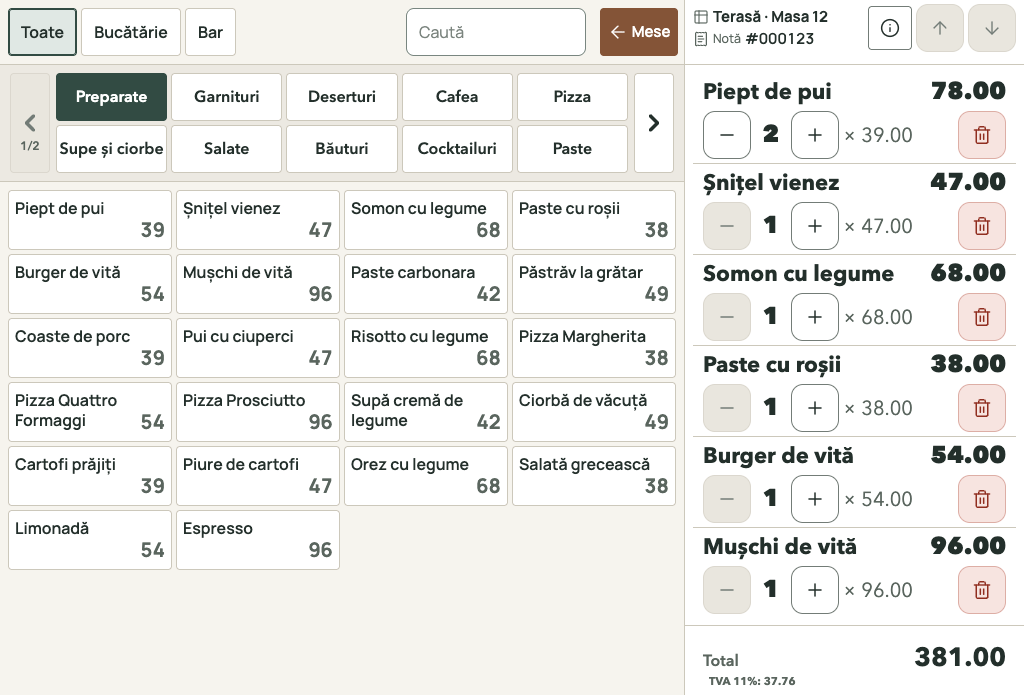
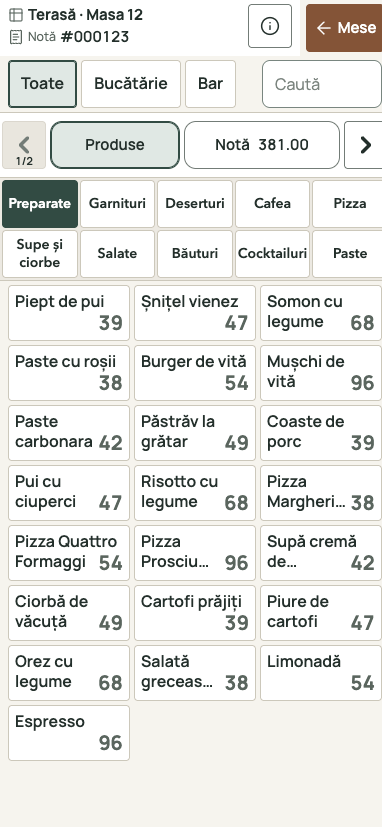
RostPos sales interface: selected Prepared dishes, table 12 and order #000123.
The same products and order #000123 in the mobile layout of the POS components.
RostPos sales on a normal 15-inch terminal and in the mobile layout. The same products and order, with demonstration data.

Main POS on Windows or Android

At the counter, the operator selects products and takes payment at the POS. For table service, they follow orders and settle the table’s bill. RostPos is offered on Windows and Android; configuration depends on your workflow and equipment.

Table orders with Waiter on Android

Waiters select products and review the table’s order on their phone. RostPos Waiter on Android handles order taking; payment takes place at the POS.

Management in a browser too

Your catalogue, prices, inventory and reports are also accessible in a browser, without installation for Web management. You can also use the RostPos Windows or Android application.

Questions about RostPos

What can I use without installation?

Web management opens in a browser after signing in. Operational Windows and Android applications have their own installation and configuration.

Can I keep my current equipment?

We check terminals, phones, printers and fiscal equipment before agreeing a configuration. Compatibility is discussed for your venue’s devices and workflow.

What should I prepare for the demonstration?

Tell us how you take orders, how many points of sale you use and which equipment you work with. These details help us discuss a suitable configuration.

We choose the configuration around your venue.

Leave your phone, venue name and business tax ID. We will discuss your team’s workflow and equipment before preparing a quotation.